
How do I gift a Box subscription?
- Go to https://talkbox.mom/box
- Add the subscription you want to gift to your cart.
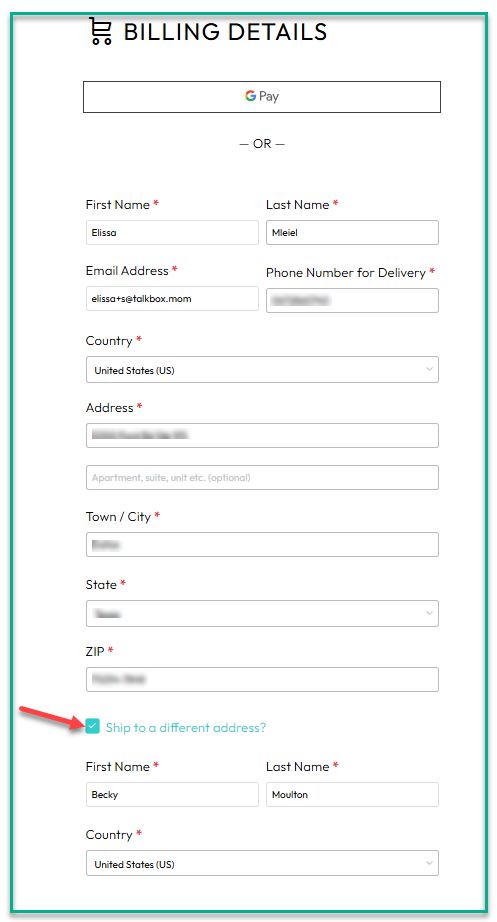
- If you'd like the Box to ship directly to your giftee's address:
- Check "Ship to a different address?"
- Enter the giftee's address
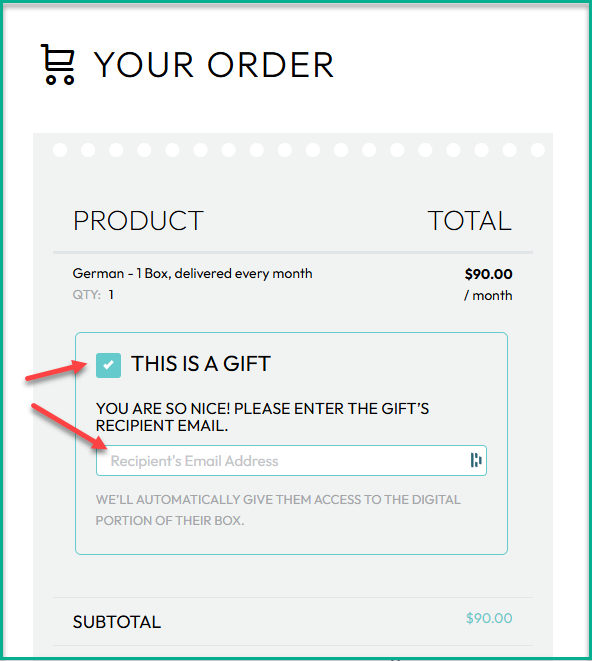
- Under the product (right panel), check “This is a gift.”
- Enter the giftee’s email address
- Complete checkout
What happens next
- If the giftee already has a TalkBox.Mom account, the Box will be added to their account automatically.
- If the giftee does not have an account, they’ll receive an email prompting them to set one up.
- Once their account is created, they’ll have access to the first Box in the Companion App.
About the subscription
- The subscription will renew automatically until it is paused, canceled, or all 9 Boxes have shipped.
- Only the gifter has access to the payment information and can update the payment method.
- Both the gifter and the giftee can pause the subscription, cancel the subscription, and update the shipping address


If you need to pause or cancel the gift subscription, see: 👉 How do I pause or cancel a gift subscription?